How to Configure GitHub Copilot in Neovim with nvim-cmp Integration
Step-by-step guide to integrating GitHub Copilot with nvim-cmp in Neovim for non-intrusive AI code completion using zbirenbaum/copilot.lua.
Introduction
In my latest posts, I have explored using AI to boost my productivity. Please see the following posts if you haven't already:
- Building AI Agents with Model Context Protocol (MCP) - A Complete Guide
- How to Generate Terraform Code with AI: Claude + GitHub MCP Tutorial
These tools are great, but there are ways to use them more efficiently. Working in the Terminal is my preferred way of working, and Neovim is my go-to editor for most of my work. I have tried github/copilot.nvim for a while. It has helped me boost my productivity, especially when it comes to writing text or documenting my code. However, there are some annoying quirks with my current settings:
-
There are always suggestions from Copilot when typing. Sometimes it is more disturbing than helpful, especially while writing code.
-
The TAB key accepts the suggestion from Copilot. Usually I want to use TAB for indentation.
In this post, I am going to do something about it. My desired outcome is:
-
Find and install plugins that are more customizable and easy to integrate into my Neovim setup.
-
Remove "suggest as you type" feature and replace with suggestion in autocomplete menu.
Table of Contents
- My current Copilot setup
- Finding something better
- Retiring github/copilot.nvim
- Installing zbirenbaum/copilot.lua
- Testing the new setup
- Summary - Generated by Copilot AI
- Next Steps
My current Copilot setup
This is my Neovim Config structure before we start improving. I have simplified the plugins folder, there are lots of plugins there in my setup. The current config file for github/copilot.nvim is highlighted below:
.
├── after
│   ├── ftplugin
│   │   └── markdown.lua
│   └── queries
│       └── markdown
│           └── injections.scm
├── init.lua
├── lazy-lock.json
├── lua
│   └── jihillestad
│       ├── core
│       │   ├── autocmds.lua
│       │   ├── init.lua
│       │   ├── keymaps.lua
│       │   └── options.lua
│       ├── lazy.lua
│       └── plugins
│           ├── backup
│           ├── github-copilot.lua
│           ├── init.lua
│           └── lsp
│               ├── lspconfig.lua
│               └── mason.lua
└── spell
Finding something better
Now we're going to find a better plugin for Copilot integration. LazyVim is among the most proven quick setups for most people to get into Neovim, let's have a look what they are using for their AI integration.
It turns out they are using zbirenbaum/copilot.lua as their plugin of choice. It seems to be more feature rich and customizable than my old plugin.
Retiring github/copilot.nvim
Let's get to work. Before installing the new stuff, the old has to go.
Step 1: Disable github/copilot.nvim
Disable the plugin by adding enabled = false to the plugin config file
highlighted below:
./plugins/github-copilot.lua
-- ==================================================================================================
-- Title: GitHub Copilot Plugin Configuration
-- About: This file configures the GitHub Copilot plugin for Neovim.
-- ==================================================================================================

return {
  {
    "github/copilot.vim",
    enabled = false,
    lazy = true,
    event = { "BufReadPre", "BufNewFile" },
  },
}
Step 2: Move the old config file to ./plugins/backup.
.
└── plugins
   ├── backup
       └── github-copilot.lua
   ├── init.lua
   └── lsp
       ├── lspconfig.lua
       └── mason.lua
Step 3: Restart Neovim and verify that the plugin is uninstalled.
I use Lazy.nvim as my plugin manager. I use the command :Lazy to
open the Lazy interface, then I can see that github/copilot.vim is no
longer listed among the installed plugins.
Installing zbirenbaum/copilot.lua
Step 1: Organizing my Neovim folders
To make my setup easier to manage, I decided to create a dedicated folder for AI related plugins. In here we create 2 files:
- copilot.lua
- copilot-cmp.lua
.
└── plugins
   └── ai
       ├── copilot.lua
       └── copilot-cmp.lua
   ├── backup
       └── github-copilot.lua
   ├── init.lua
   └── lsp
       ├── lspconfig.lua
       └── mason.lua
Step 2: Allow Lazy plugin manager to discover the new ai folder
You need to edit the following line for Lazy.nvim to find the new ./plugins/ai folder:
-- ==================================================================================================
-- Title: Lazy.nvim Plugin Manager Setup
-- About: This script bootstraps and configures the Lazy.nvim plugin manager for Neovim.
-- ==================================================================================================

local lazypath = vim.fn.stdpath("data") .. "/lazy/lazy.nvim"
if not (vim.uv or vim.loop).fs_stat(lazypath) then
  local lazyrepo = "https://github.com/folke/lazy.nvim.git"
  local out = vim.fn.system({ "git", "clone", "--filter=blob:none", "--branch=stable", lazyrepo, lazypath })
  if vim.v.shell_error ~= 0 then
    vim.api.nvim_echo({
      { "Failed to clone lazy.nvim:\n", "ErrorMsg" },
      { out, "WarningMsg" },
      { "\nPress any key to exit..." },
    }, true, {})
    vim.fn.getchar()
    os.exit(1)
  end
end
vim.opt.rtp:prepend(lazypath)

require("lazy").setup(
  { { import = "jihillestad.plugins" }, { import = "jihillestad.plugins.lsp" }, { import = "jihillestad.plugins.ai" } },
  {
    checker = {
      enabled = true,
      notify = false,
    },
    change_detection = {
      notify = false,
    },
  }
)
vim.g.skip_ts_context_commentstring_module = true
Step 3: Install zbirenbaum/copilot.lua
Edit ./plugins/ai/copilot.lua to include the following code. The highlighted lines are
removing suggest as you type feature.
-- ==================================================================================================
-- Title: Copilot configuration
-- About: Configuration for GitHub Copilot plugin for Neovim
-- ==================================================================================================

return {
  {
    "zbirenbaum/copilot.lua",
    cmd = "Copilot",
    build = ":Copilot auth",
    event = "InsertEnter",
    opts = {
      suggestion = { enabled = false }, -- disable inline suggestions
      panel = { enabled = false }, -- disable Copilot panel
      filetypes = {
        markdown = true,
        help = true,
      },
    },
  },
}
Step 4: Integrate Copilot with nvim-cmp for selectable autocomplete suggestions
Edit ./plugins/ai/copilot-cmp.lua to include the following code:
-- ==================================================================================================
-- Title: Copilot CMP Integration
-- About: Configuration for integrating GitHub Copilot with nvim-cmp
-- ==================================================================================================

return {
  {
    "zbirenbaum/copilot-cmp",
    dependencies = { "zbirenbaum/copilot.lua" },
    event = "InsertEnter",
    config = function()
      require("copilot_cmp").setup({
        fix_pairs = true,
      })
    end,
  },
}
Step 5: Add zbirenbaum/copilot-cmp as a nvim_cmp source
Add these lines to ./plugins/nvim-cmp.lua:
-- ==================================================================================================
-- Title: nvim-cmp Configuration
-- About: This file configures the nvim-cmp plugin for autocompletion in Neovim.
-- ==================================================================================================

return {
  "hrsh7th/nvim-cmp",
  event = "InsertEnter", -- load nvim-cmp when entering insert mode
  dependencies = {
    "hrsh7th/cmp-buffer", -- source for text in buffer
    "hrsh7th/cmp-path", -- source for file system paths
    "micangl/cmp-vimtex", -- improvements for Latex
    "zbirenbaum/copilot-cmp", -- GitHub Copilot source for nvim-cmp
    "L3MON4D3/LuaSnip", -- snippet engine
    "saadparwaiz1/cmp_luasnip", -- for autocompletion
    "rafamadriz/friendly-snippets", -- useful snippets
    "onsails/lspkind.nvim", -- vs-code like pictograms
  },
  config = function()
    local cmp = require("cmp")

    local luasnip = require("luasnip")

    local lspkind = require("lspkind")

    -- loads vscode style snippets from installed plugins (e.g. friendly-snippets)
    require("luasnip.loaders.from_vscode").lazy_load() --

    cmp.setup({
      completion = {
        completeopt = "menu,menuone,preview,noselect",
      },
      snippet = { -- configure how nvim-cmp interacts with snippet engine
        expand = function(args)
          luasnip.lsp_expand(args.body)
        end,
      },
      mapping = cmp.mapping.preset.insert({
      -- ...
      }),
      -- sources for autocompletion
      sources = cmp.config.sources({
        { name = "nvim_lsp", group_index = 2 },
        { name = "luasnip", group_index = 2 }, -- snippets
        { name = "vimtex", group_index = 2 }, -- snippets
        { name = "copilot", group_index = 2 }, -- GitHub Copilot
        { name = "buffer", group_index = 2 }, -- text within current buffer
        { name = "path", group_index = 2 }, -- file system paths
      }),
      -- configure lspkind for vs-code like pictograms in completion menu
      formatting = {
      -- ...
      },
    })
  end,
}
Step 6: Disable Neovim LSP loading for the Copilot plugin
The zbirenbaum/copilot.lua plugin runs its own language server process
to communicate with GitHub's Copilot service. We need to prevent Neovim's
built-in LSP client from attempting to manage it separately. Add these
settings in ./plugins/lsp/lspconfig.lua:
-- ==================================================================================================
-- Title: nvim-lspconfig Configuration
-- About: This file configures the nvim-lspconfig plugin for Neovim's built-in
-- Language Server Protocol (LSP)
-- ==================================================================================================

return {
  "neovim/nvim-lspconfig",
  event = { "BufReadPre", "BufNewFile" },
  dependencies = {
    "hrsh7th/cmp-nvim-lsp",
    { "antosha417/nvim-lsp-file-operations", config = true },
    { "folke/lazydev.nvim", opts = {} },
  },
  config = function()
    -- import mason_lspconfig plugin
    local mason_lspconfig = require("mason-lspconfig")

    -- import cmp-nvim-lsp plugin
    local cmp_nvim_lsp = require("cmp_nvim_lsp")

    local keymap = vim.keymap -- for conciseness

    vim.api.nvim_create_autocmd("LspAttach", {
      group = vim.api.nvim_create_augroup("UserLspConfig", {}),
      callback = function(ev)
        -- Buffer local mappings.
        -- See `:help vim.lsp.*` for documentation on any of the below functions
        local opts = { buffer = ev.buf, silent = true }

        -- set keybinds
    })

    -- used to enable autocompletion (assign to every lsp server config)
    local capabilities = cmp_nvim_lsp.default_capabilities()

    -- Change the Diagnostic symbols in the sign column (gutter)

    -- Define server configurations
    local server_configs = {
      emmet_ls = {
        filetypes = { "html", "typescriptreact", "javascriptreact", "css", "sass", "scss", "less", "svelte" },
      },
      lua_ls = {
        settings = {
          Lua = {
            diagnostics = { globals = { "vim" } },
            completion = { callSnippet = "Replace" },
            workspace = { checkThirdParty = false },
          },
        },
      },
      tsserver = {
        settings = {
          typescript = {
            inlayHints = {
              includeInlayParameterNameHints = "all",
              includeInlayFunctionParameterTypeHints = true,
            },
          },
        },
      },
      terraformls = {
        init_options = {
          experimentalFeatures = {
            prefillRequiredFields = true,
          },
        },
      },
      copilot = {
        enabled = false,
      },
    }

    -- Configure and enable servers
    for _, server_name in ipairs(mason_lspconfig.get_installed_servers()) do
      local config = vim.tbl_deep_extend("force", {
        name = server_name,
        capabilities = capabilities,
      }, server_configs[server_name] or {})

      vim.lsp.config(server_name, config)
      vim.lsp.enable(server_name)
    end
  end,
}
Step 7: Restart Neovim and verify installation
When restarting Neovim, use the command :Lazy to open the Lazy interface.
Verify the installation status of the new plugins.
Testing the new setup
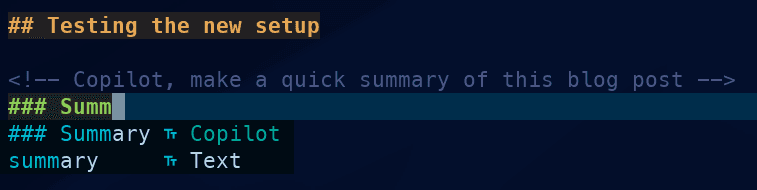
It's time to put Copilot to the test. I write some comments below to assist the AI in creating a "quick and dirty" summary for this blog post:
Step 1: Prompting the AI
Create a comment containing a simple prompt for Copilot. On the next line, create a header. This triggers Copilot answering in auto-complete:

Step 2: Autocomplete in action
On the next line, write the first two words for a summary. If autocomplete returns multiple suggestions from Copilot, select the best one:

There you have it!
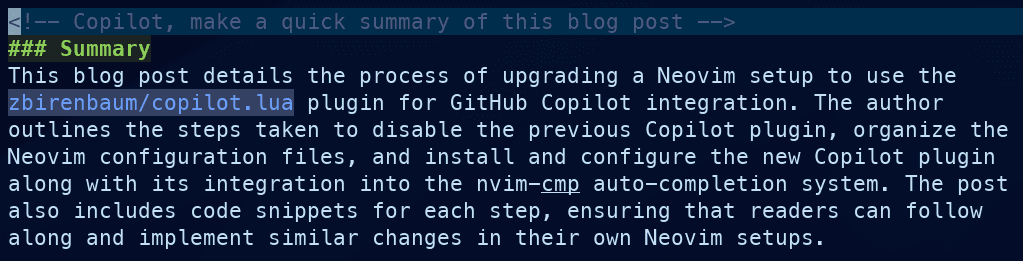
Summary - Generated by Copilot AI
This blog post details the process of upgrading a Neovim setup to use the
zbirenbaum/copilot.lua plugin for GitHub Copilot integration. The author
outlines the steps taken to disable the previous Copilot plugin, organize the
Neovim configuration files, and install and configure the new Copilot plugin
along with its integration into the nvim-cmp autocomplete system. The post
also includes code snippets for each step, ensuring that readers can follow
along and implement similar changes in their own Neovim setups.
Next Steps
I am still improving my workflow. Next step is to find other ways to work with AI in my Terminal, including Claude Code, Fabric and Opencode. Stay tuned!
Did you find this helpful, please support me on Ko-fi.com - jihillestad